Rebuilding the Entry and Entity Modals in Project Culper
I spent some time this week reworking how agents create and edit records in Project Culper, and the changes ended up touching more than I expected.
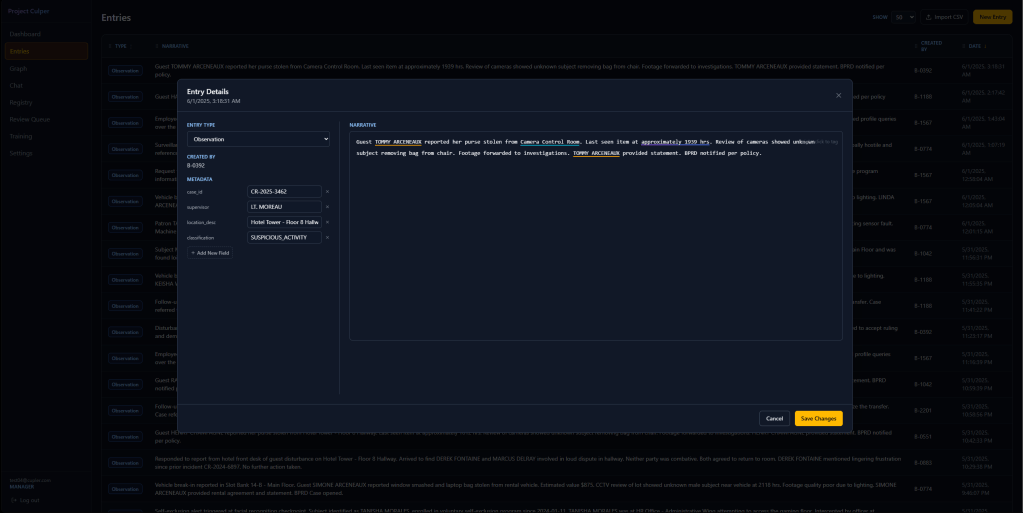
The first problem was simple: the entry creation and edit modals felt cramped, and they were not sized consistently with each other. I widened both to a shared, larger layout so switching between creating a new entry and editing an existing one feels like the same tool, not two different ones.
The bigger addition was ad hoc metadata on entries. Before this, an entry’s narrative and type were the only structured fields you could fill in. Now there is a “+ Add New Field” button right in the modal, so an agent can attach a case number, a supervisor name, or any other key value pair without leaving the entry they are working on.
Entities got a similar treatment, but the underlying problem was different. Object types already supported custom fields, but adding one meant leaving the entity you were editing to visit a separate settings screen. I moved that capability inline too.
I also redesigned the entity modal itself. Instead of a single narrow form, it now mirrors the entry modal’s layout: a sidebar for name, aliases, and custom fields, plus a main panel showing real stats, first detected date, last seen date, and how many entries reference that entity, with a short description field underneath for quick notes.

