This week on Project Culper, the work shifted from wiring the backend skeleton to making the product actually feel like a product. We touched three areas: the NER entry editor, the beginning of the landing page, and the full user journey from account creation to submitting a first intelligence entry.
The Narrative Field and NER Integration
The entry editor is the heart of Project Culper. Everything else, the knowledge graph, the LLM chat interface, the entity registry, only has value because agents are putting quality narratives into the system. So getting this component right mattered.
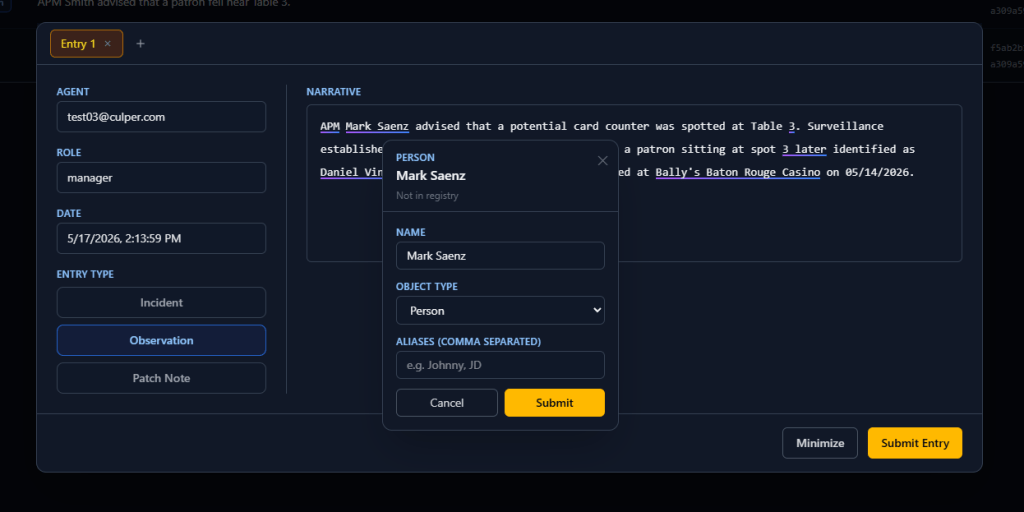
The editor itself is a large free-form text area, closer in spirit to a Notion page than a form field. As the agent types, the frontend waits 600 milliseconds after the last keystroke before sending the current text to the backend. That pattern is called debouncing, and it exists specifically to avoid hammering the NER microservice on every single character. Once the pause threshold is hit, the full narrative goes to the API, which forwards it to the spaCy service running in its own container. The service returns entity spans: each span is a start index, an end index, the surface text, and a type label (PERSON, LOCATION, VEHICLE, ORG, and so on). The frontend takes those spans and renders a purple-to-blue gradient underline beneath each recognized entity, intentionally distinct from a browser spellcheck underline so agents are never confused about what the system is flagging.
When the NER model detects something it cannot confidently link to an existing registry record, an inline prompt appears directly in the editor, similar to the slash command pattern in Notion. The agent can create a new entity object without navigating away. That design decision matters: breaking the agent out of the writing flow to handle a form in a different tab would train people to dismiss detections rather than resolve them. Keeping it inline keeps the data clean.
Landing Page Groundwork
The landing page work this week was brief but important. The primary goal was establishing the tenancy provisioning entry point: where a new organization lands, reads about the platform, and decides to sign up. The flow from that landing page feeds directly into the configuration wizard that runs before any agents can begin logging entries. We laid out the routing structure and confirmed how the landing experience hands off to account creation without requiring a sales call or manual provisioning step on our end.
The Full User Journey
Mapping the complete flow from zero to first entry clarified a lot of sequencing decisions. A new user lands on the marketing page and registers an account. The system immediately provisions a tenant environment and drops the manager into an onboarding wizard. The wizard walks through three setup steps: defining the object schema (what types of entities will be tracked), populating an initial entity registry (seeding the NER model with day-one known entities), and creating agent accounts for the rest of the team.
Once setup is complete, an agent logs in and sees the dashboard. From there, navigating to a new entry opens the narrative editor. The agent writes, the NER pipeline processes, entities get highlighted and linked, and when the entry is submitted the knowledge graph updates to reflect the new connections. What started as blank infrastructure now has a path a real person can walk through.
Next week: tightening the entity linking logic and connecting the registry table to the graph layer.

